
hop earth wiki
Hop Earth: How to Create a Race and Share It (2026 Guide)
Step-by-step guide to the Hop.Earth race maker: create a race in Hop Earth, share the race link, fix a link that will not open, and see what the tool cannot do yet.
How to Create and Share a Hop.Earth Race
If you searched for hop earth how to create a race, this guide focuses on the current in-game race workflow and how to share it safely.
Hop.Earth lets you build a race inside multiplayer: pick a start point, add checkpoints along real-world roads, name the event, then share it as an in-session invite or a join link. The flow below matches the current client, but menu labels change between builds, so treat the wording as a map rather than exact button text.
Last verified against the live client: 2026-09-21. Hop.Earth is in active development during Season Zero, so any step here can be renamed in the next build. If a label has moved, the sequence normally still applies.
What a Hop.Earth Race Actually Is
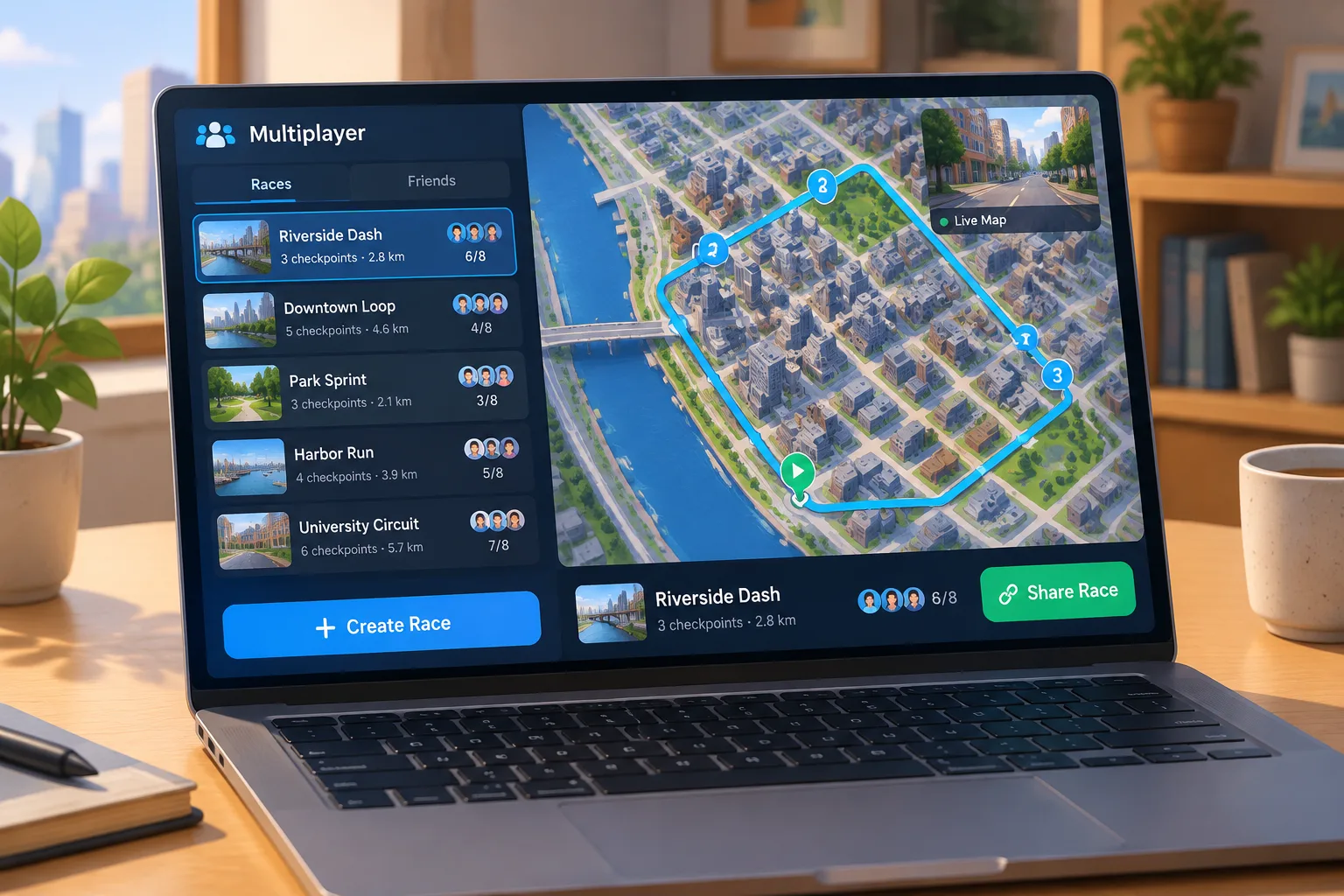
A race in Hop.Earth is not a separate mode you download. It is a multiplayer session with two extra pieces of data attached: a start location and an ordered list of checkpoints. Everyone in the session drives on the same streamed map — real road geometry and satellite elevation, pulled in as you move — and the race layer simply tells the client where to send you first, second, third, and so on.
That distinction matters when things break. Because the race lives inside a session rather than in a standalone file, its state depends on the host being present. It also means there is nothing to install, no account tier to unlock, and no separate "race maker" product to hunt for in a store. You are configuring a session, not publishing a level.
If you have not touched the multiplayer layer yet, start with Hop.Earth multiplayer races and Hop.Earth controls — knowing how to summon a car and read the minimap will save a lot of confusion once you begin placing checkpoints.
Before You Create a Race: What You Need
Race creation is not demanding, but it is not free of constraints either. The table below lists what genuinely affects whether you can build and run a race.
| Requirement | Why it matters |
|---|---|
| A current desktop or mobile browser | Hop.Earth runs in-browser with no download; older engines struggle to render streamed tiles |
| A stable connection | Map geometry and elevation stream continuously, and a race with four players multiplies that traffic |
| Access to a multiplayer session | Race configuration lives in the multiplayer layer, not in single-player free roam |
| Host or equivalent control | Only the session owner can confirm race settings in the builds observed so far |
| A rough route plan | Checkpoints are ordered, so a route you have not mentally mapped usually produces a messy race |
A useful habit: drive the route once in free roam before you build it as a race. Discovering that a checkpoint sits behind a one-way barrier is much cheaper when nobody is waiting on a start line. Our Hop.Earth driving tips cover handling, braking, and how cars behave on elevation changes.
How Do You Create a Race in Hop.Earth?
Open multiplayer, join or host a session, then use the race or event option inside that session's menu. You set a start point, drop checkpoints on the roads you want racers to follow, give the race a name, and confirm. The session owner keeps control of the race until it ends.
Step 1: Load Multiplayer and Confirm You Are the Host
Race controls appear to sit with the session owner. Join a session you created, or ask the current host to hand over control before you start. If the race option is greyed out or missing entirely, that is the most common reason — not necessarily a bug.
Also check that you are loaded into the world rather than sitting on a lobby screen. Some actions queue until the map has streamed in around your spawn point.
Step 2: Set the Start Point
Your start point is wherever you want the field to launch from. In practice that is either your current position after a parachute drop, or a marker you place on the map. Pick somewhere with room: a wide junction, a car park, a straight stretch of dual carriageway. Tight alleys look dramatic in theory and produce pile-ups in practice.
If your build lets you edit the start after confirming, do it now rather than later. Moving a start line once racers have spawned usually means restarting the race from scratch.
Step 3: Add Checkpoints in Order
This is the part that decides whether your race is fun. Each checkpoint is added in sequence, and the client expects racers to hit them in that order.
- Space them so a competent driver can either see the next one from the last, or reach it without opening the map.
- Prefer long, readable roads over short technical segments while you are learning the tool.
- Avoid checkpoints placed just past a level crossing, a tunnel mouth, or a complex motorway interchange until you know how the ring renders at speed.
- Test on the same device class your friends use. A checkpoint that is obvious on a desktop monitor can be invisible on a phone.
Step 4: Name the Race and Confirm
Give it a short, searchable name — something you would actually type into a chat box. Long names get truncated in lists, and if you plan to run the same route weekly, a naming pattern helps players pick the right instance.
Step 5: Start the Race
Once confirmed, the session should place everyone at the start point and begin the countdown. Cars are summoned rather than selected from a garage screen in the builds observed so far, so make sure everyone knows how to spawn a vehicle. If that is still unfamiliar, Hop.Earth controls is the fastest primer.
How Do You Share a Hop.Earth Race?
Share a race in one of two ways: send the join link if your build exposes one, or invite players from inside the multiplayer session. Session-based invites stop working once the host leaves or the session closes. Whether a copied link survives a page reload is community-reported rather than confirmed, so do not build a weekly league on that assumption without testing it in your own build first.
Sharing the Race Link
If a link or copy button appears after you confirm the race, treat it as a session link rather than a permanent address. Send it through whatever chat channel your group uses, and tell people to open it in the same browser they normally play in — switching browsers mid-session tends to drop you back to a fresh lobby.
Sharing Inside a Session
The more reliable path: get everyone into the multiplayer session first, then create the race and start it. Invites sent to people who are already in the lobby have fewer moving parts than links opened cold by someone who has never joined.
Hop.Earth Race Link Not Working? Troubleshooting
A race link usually fails for one of four reasons: the session has ended, the host has left, the link was opened in a different browser profile, or the client simply did not stream the map in time. Work through the table below in order — most cases resolve at step one or two.
| Symptom | Likely cause | What to try |
|---|---|---|
| Link opens but shows an empty lobby | Session closed or host left | Ask the host to recreate the race and resend |
| Link opens into free roam | You were never added to the session | Join the session first, then open the link |
| Page loads indefinitely | Map tiles stalled | Refresh once, then check connection stability |
| Race option missing from the menu | You are not the session owner | Ask the host for control, or host your own session |
| Checkpoints invisible at speed | Render distance on that device | Rebuild with longer, straighter segments |
If nothing on that list helps, our Hop.Earth multiplayer races page tracks the known friction points in the current build.
Race Maker Limits: What It Cannot Do Yet
Be realistic about the tool before you plan a championship. As of the verification date, the race layer is a session configuration, not a publishing platform.
- No public race browser. There is no directory of community races you can browse and join cold. Races appear to be shared socially, by invite.
- No confirmed lap or class editor. Multiple laps, car classes, and balance settings are not confirmed in the current client.
- No persistence guarantee. Whether a configured race survives a host disconnect or a client update is not documented publicly.
Verified Behaviour vs Community Observation
Keep these two categories separate when you plan an event, because only one of them is stable enough to depend on.
| Item | Status |
|---|---|
| Races are configured inside a multiplayer session | Verified in the current client |
| A start point plus ordered checkpoints define the race | Verified in the current client |
| Session owner controls race configuration | Verified in the builds observed so far |
| Copied race links persist across reloads | Community-reported, not confirmed |
| Maximum checkpoint count | Not published; reports vary by build |
| Race history or leaderboards | Not documented publicly |
Frequently Asked Questions
Can you create a race in Hop.Earth on a phone?
Hop.Earth runs in mobile browsers and the multiplayer layer loads on them, but precise checkpoint placement is much harder on a touchscreen. If you are building anything longer than a short sprint, place the checkpoints on a desktop and race from the phone.
Do you have to be the host to create a race?
In the builds observed so far, race configuration sits with the session owner. If the race option is unavailable to you, ask the host to hand over control, or start your own session and rebuild the route there.
How many checkpoints can one race have?
There is no published limit. Community reports vary between builds, and the practical ceiling usually arrives long before any technical one — a race with too many checkpoints stops being readable. Something in the ten-to-fifteen range is a sensible starting point to test.
Does a Hop.Earth race link expire?
Treat it as session-bound. Once the host leaves or the session closes, the underlying race goes with it, even if the link still opens a page. Test persistence in your own build before you rely on a link for a scheduled event.
Can you edit a race after creating it?
Editing before the start is the safe window, and moving the start point after racers have spawned generally means restarting. Assume you will rebuild rather than patch, and keep your route notes somewhere outside the game.
Is there a separate Hop.Earth race maker app?
No. There is no standalone race creator to install. For more general driving help between events, games like Hop.Earth covers similar browser titles and what they do differently.
Start Building
Creating a race in Hop.Earth takes a few minutes: get into a multiplayer session, place a start, order your checkpoints, name it, and share it while the session is live. The tool is young and Season Zero builds move quickly, so re-check the labels the next time you play.
When you are ready, head to hop.earth to play, or continue with our Hop.Earth multiplayer races guide for session etiquette and connection fixes. If checkpoints are what you want to nail first, the Hop.Earth driving tips page is the better next read.